A video walkthrough of this comparison is available on YouTube: "4 Ways to Visualize Your DJ Set". The full interactive version of the presentation lives at vizloom.com/4-ways-to-visualize-your-dj-set.
Music visuals are redefining how people discover music. Every big show comes with a top-notch visual production now, and those clips travel on social media far and wide.
Meanwhile, thanks to technology and automation, everyone is becoming a DJ, and standing out on your selection alone gets harder every year. That is why it's worth learning to craft a good visual show: it can be a great addition to make your set more memorable, immersive and unmistakably yours. And the opportunity is always there, wherever you play: Twitch, YouTube, a club or a festival stage... There is always a screen or a projector available.
There are however many elements that come together into making a good music visual, and certain aspects like ensuring strong synergy between sound and video have always required a ton of time and effort. That's why so many emerging artists quietly give up on it... Even as technology is rapidly making it easier.
So I thought of mapping out four workflows to help you get started on adding visuals to your DJ set, scoring each one on difficulty, artistic agency, and how closely what you see matches what you hear. Hopefully you'll find one that works well for you. In this post I'll cover:
- real-time visualizers, the most popular option by far;
- traditional VJ software, and why video is such a popular medium;
- pros and cons of node-based creative apps;
- preparing one video per song, both through a video editor and through a DAW;
- whether AI video generators can be leveraged for this;
- where Vizloom, the app I've been building, tries to fill a gap.
A caveat before we start: I'll be scoring workflows, not individual apps. All the software I'm about to discuss is incredibly deep, and can be used and combined in pretty much infinite permutations. You'll even see the same apps come up in different workflows with different scores. What I'm rating is the specific path I imagine you taking: visuals that need to run while you stay focused on the mix. And most importantly, these scores aren't scientific. There were no focus groups and no polls involved in formulating them. These are just a way to express my own understanding of the landscape.
Who this is for, and what I'm leaving out
This exploration will be perfect for you if you want the visuals of your show to reflect a specific vibe, a specific branding. You don't compromise on your music taste, and in the same way you don't want to compromise on your visual work either. At the same time you're an emerging DJ or producer, so you have very limited time and resources.
Just to be clear, there are three things I won't be discussing:
- Simple visualizers that aren't meant to entertain a captivated audience. If you're looking to create a waveform visualizer with your logo in it so you can put your mix on YouTube, trust me, a quick Google search will take you to the right apps much quicker than reading this.
- Software for big productions that involves controlling lights, fireworks, projection mapping and whatnot. It's rare that you'll be given direct control of the venue's lighting as an emerging artist, and even if you're headlining it depends on the venue. But you'll almost always have access to an HDMI to feed your own visuals, so that's what I'll focus on. If you're a wedding DJ or a touring artist with your own rig, I hear you, but you'll still probably want to figure out visuals anyway. Finally, if the VJ is projection-mapping, no problem: they'll usually be able to feed your visuals through their setup, and integrate your work with theirs to look even more awesome!
- Playing songs that already come with their own music videos. I'm assuming you have a very particular selection creating a very particular vibe, perhaps even a niche one, and you want your visuals to follow that specific vision. So I won't be rating workflows on the assumption that a music video already exists for everything you play, although I will discuss a bunch of software you can use to do exactly that as well.
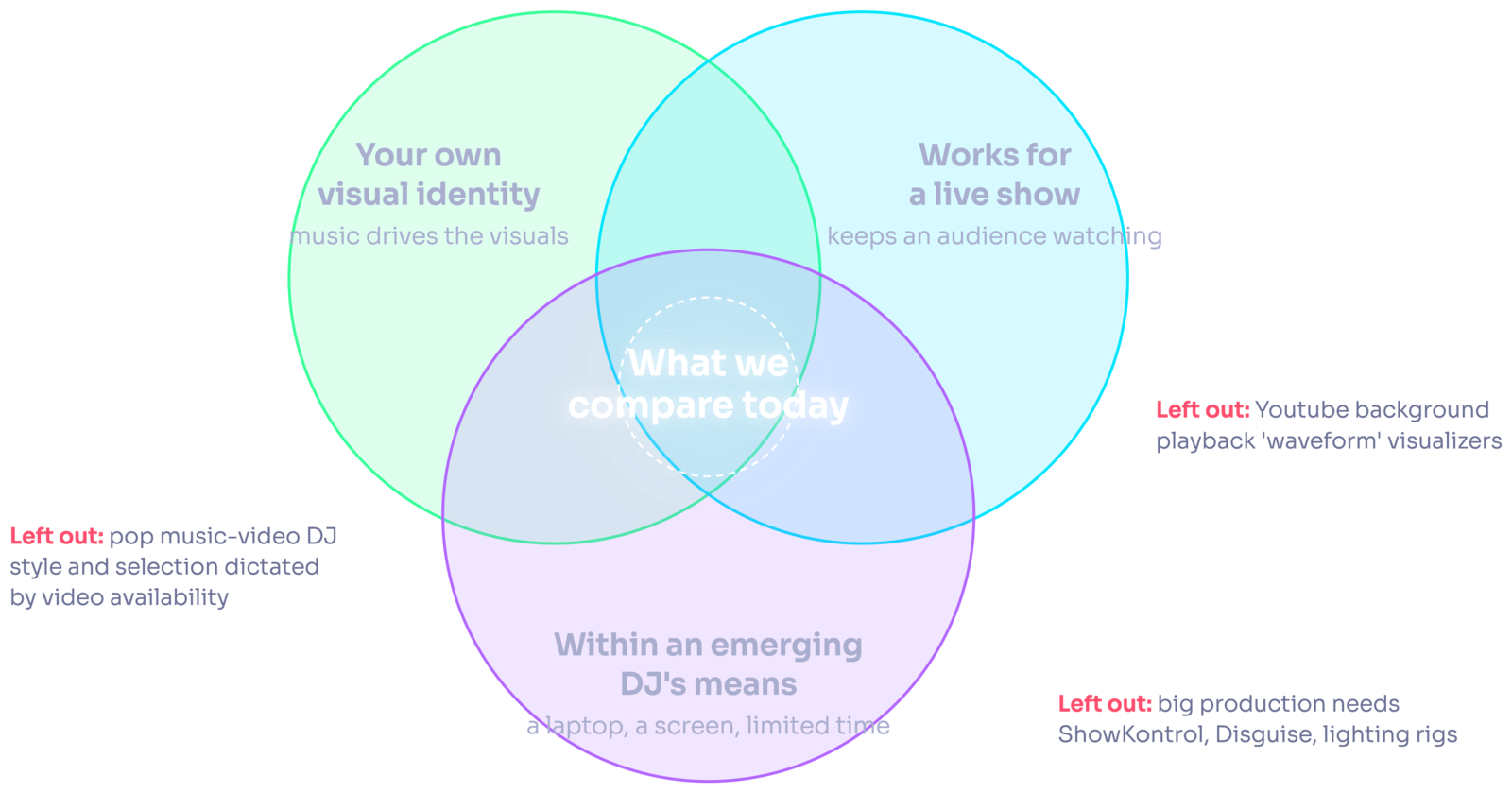
The criteria I used to choose which workflows to include in this comparison.
What's left is a lot of very popular software, which we'll look at combined into different setups, with a rating for each setup. At the end we'll also look at an interesting new option that in my opinion strikes a great balance if you're an emerging artist looking to obtain the best results with the least amount of effort. If you haven't guessed it already, I don't want to spoil the finale for you, so I'll just say it starts with "V" and ends with "loom" ;)
The three scores
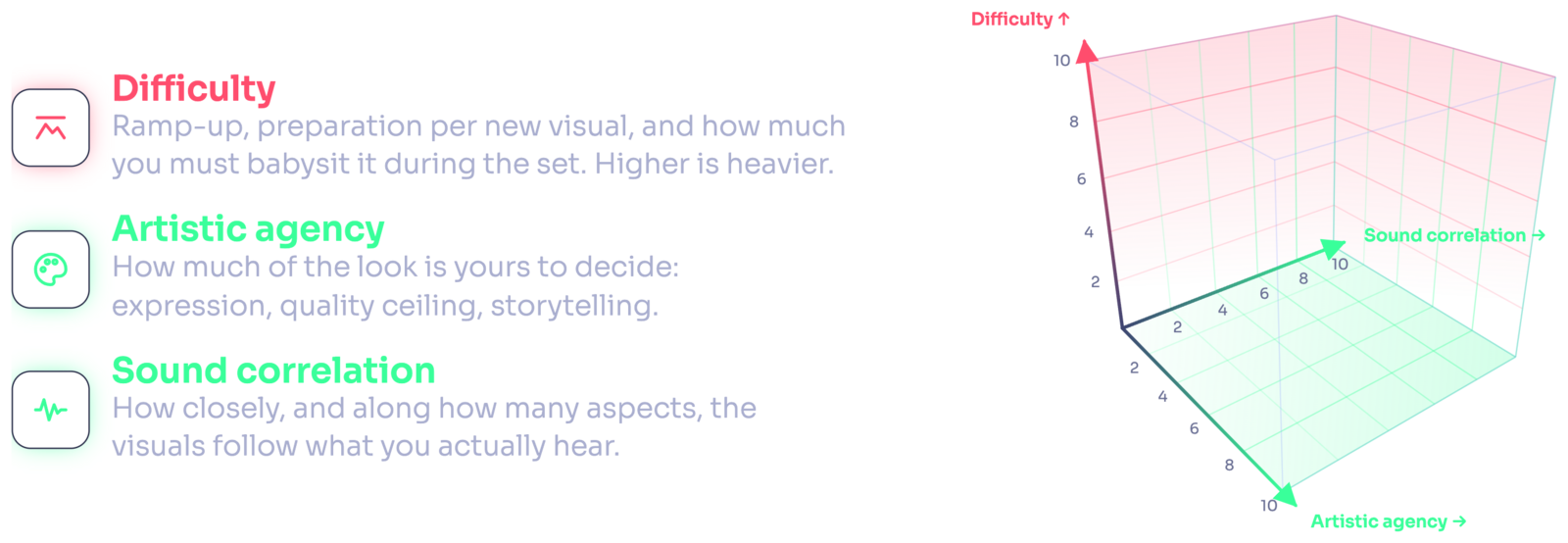
Each workflow gets three scores:
- Difficulty covers how long it takes to learn and get started, how much preparation you have to put in before your sets, and how much it requires your involvement in controlling the visuals while you're DJing. Obviously the higher this one is, the worse it is.
- Artistic agency is how much creative freedom it allows you: how specific you can be, how much it enables things like storytelling and world building.
- Sound correlation, and this one is very dear to me, is how closely what you're seeing matches what you're hearing. How many different aspects of the music track can you put up for display?
That last one is a little tricky to explain in writing, so if it doesn't quite land here, this video shows a side by side example of the same visual with no correlation, some correlation, and good correlation. It makes the point much faster than a paragraph can.
One last thing before we dive in: I'm not an expert in all of the software I'll be mentioning. I'm a visual artist, VJ, DJ, music producer, coder... So I have used a lot of it. But some of it I've only tried superficially or learnt more about through watching tutorials and doing research. So if you find me in error, please let me know and I'll correct it here.
1. The O.G. Real-time Visualizer
We'll start with the category that is the most popular and ubiquitous: the real-time music visualizer. Think abstract visuals that you can tell sort of animate according to the beat and energy level of the song. Visuals that are rendered in real time, so you can often go with a collection of presets and don't really have to worry about spending much time collecting material beforehand.
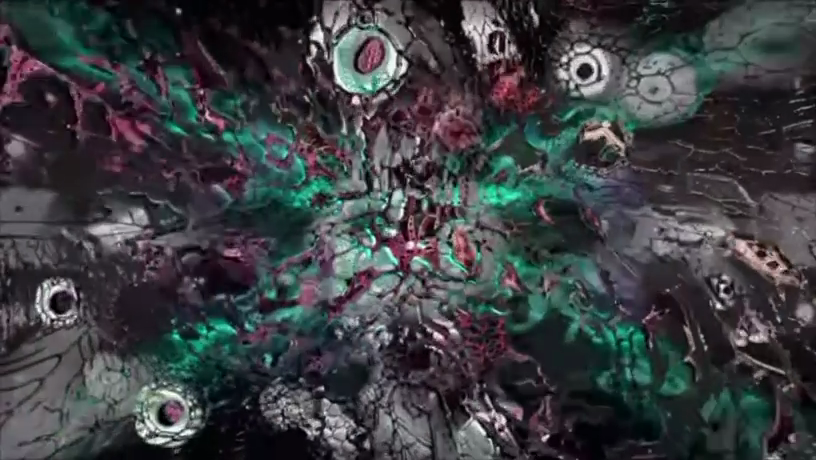
There are hundreds of apps that fall in this category. NestDrop in particular is based on MilkDrop, which was one of the Winamp visualizers, and the Winamp visualizer is really the look we're going for here. NestDrop lets you make things more interesting, for example by automatically switching through a playlist of various shaders. In terms of shaders, Synesthesia is the one that over the years I've found gives me the most "wow" effects. Really beautiful stuff, and I'm also jealous they got to pick that name first.
These apps tend to support a huge number of inputs. You can get them to follow sound quite well if you can feed separate stems or MIDI scores into them, which of course you won't really be able to do while DJing. That's why I highlight Ableton Link as an option: it can really improve your audio reactivity, because it feeds precise BPM and phase information (basically your beatgrid) from your DJ app into the visualizer.
Keep in mind that everything we'll be looking at requires you to bring a laptop. But there are standalone hardware boxes and Raspberry Pi software that let you simply plug in the sound, plug in the screen, and get going in very few easy steps. This kind of workflow is definitely the easiest option to get started, and that's one reason it is so popular.
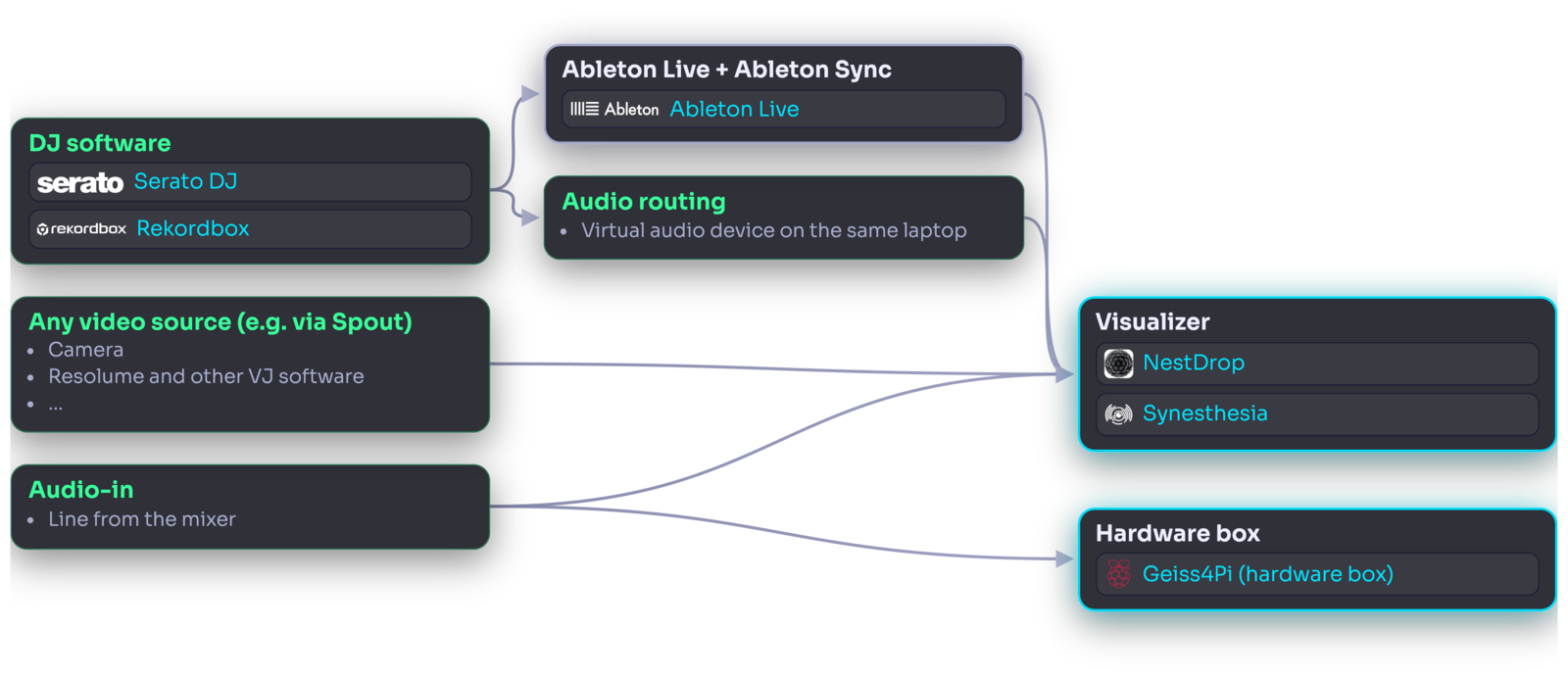
The catch is that while you're DJing you won't be babysitting the visuals, and your inputs are going to be limited to the master-out from your mixer, plus maybe Ableton Link if you're playing from your laptop. The audio reactivity isn't going to get very far in most cases. I've talked about the shortcomings of FFT-driven visualizations (i.e. based on the sound's frequency bands), and some alternative approaches, in a previous post about stems if you're curious to dive deeper.
In terms of expressive freedom, this software tends to focus on real-time rendering of shaders and procedural 3D scenes. It's difficult to be very specific about what you're displaying, and all in all it might even look a little dated (a detracting quality for some, but definitely a plus if that's the vibe you are looking to strike).
The Score
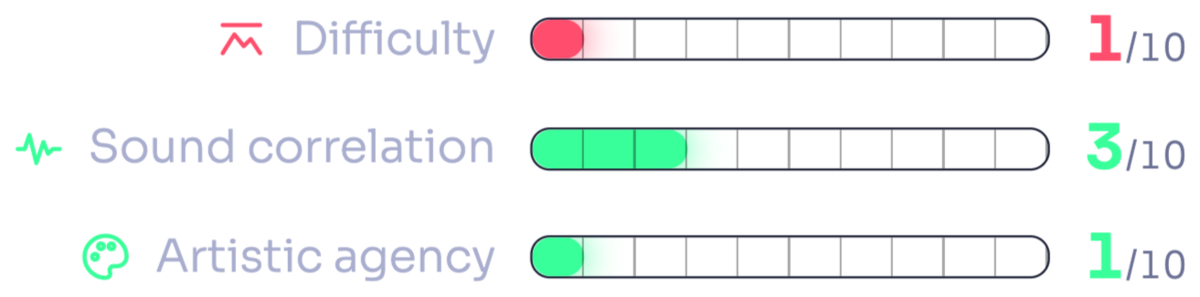
Definitely the easiest to set up and get going of all the options we'll look at. But that comes with a lot of limitations on sound correlation and on doing things like storytelling, world building and branding, unless you start using a lot of video. And if you're going to use a lot of video, there are apps better suited to that, which is what we'll look at next.
2. VJ Software
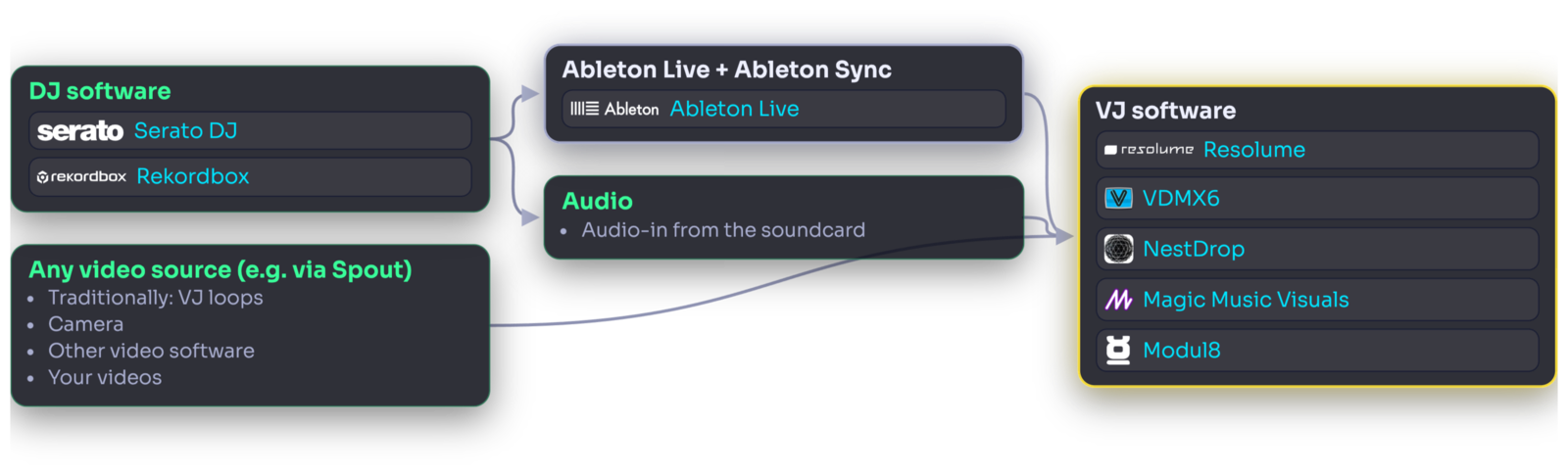
Let's look at more traditional VJ software. This is usually meant for someone else, namely the VJ, whose job is to focus on running visuals. That's the main use case I have for it as well, when I'm running visuals while other DJs are playing. But if you want more control, you can absolutely bring your laptop, ask for an HDMI, and set things up in one of these apps to run semi-automatically while you DJ.
Why video?
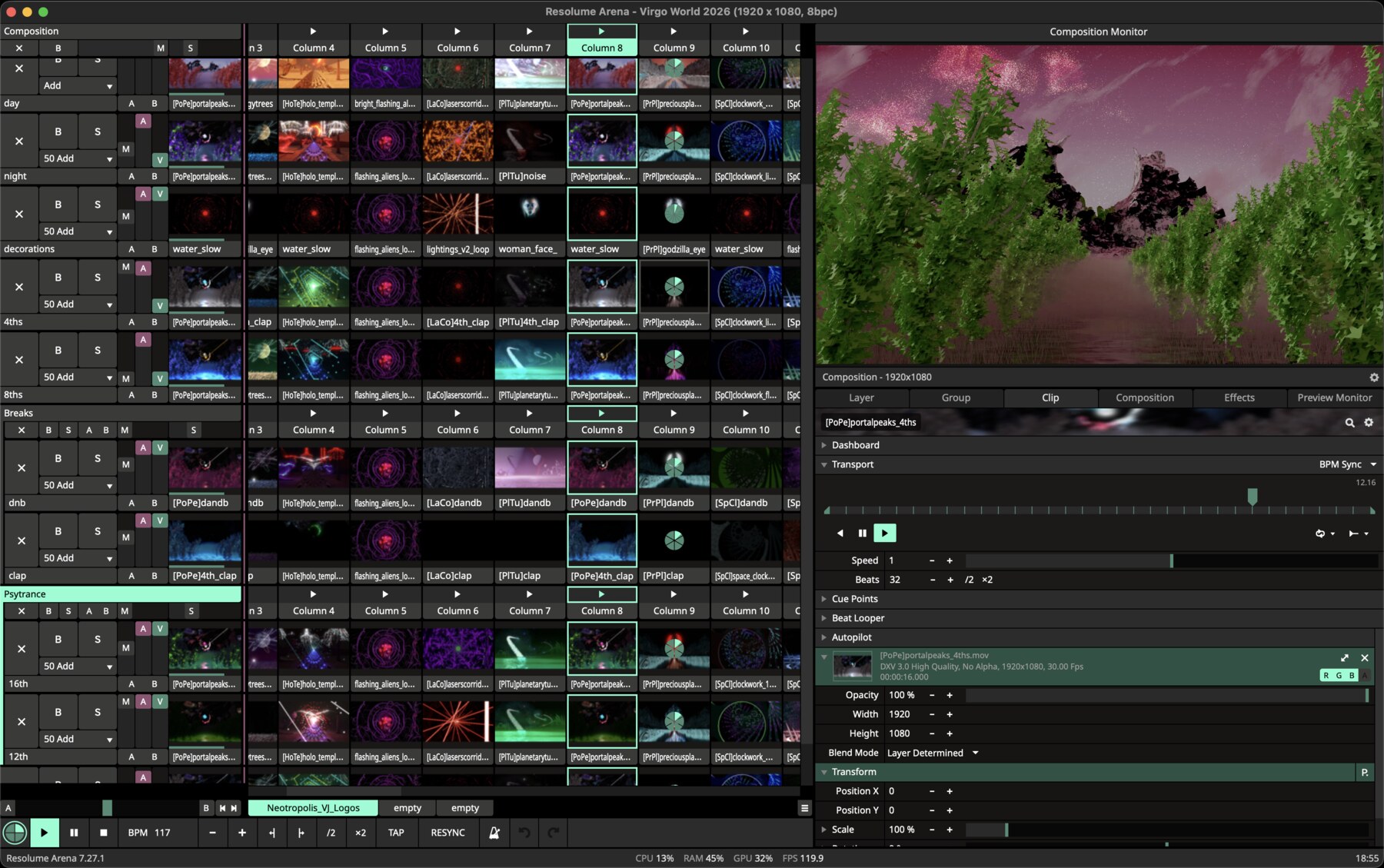
When you look at perhaps the most popular VJ software out there, Resolume, it's clear that it's really built around the idea of triggering and mixing together video clips and VJ loops. It does support its own nodes language where you can make real-time visuals as well, but at least based on what I see, professional VJs using software like this tend to rely on video first and foremost.
I'd like to point out a few reasons why that might be the case:
- Compatibility. Any artist working with almost any medium can produce something you can use this way, and on top of that video comes in so many forms. It can be a VJ loop you found online, or a webcam feed, and so on.
- Flexibility. In terms of looks, everything we've seen so far can also be pre-rendered as a video clip, but also anything you can imagine. 3D scenes, live action, shaders... It can all be baked into a video.
- Predictable resource usage. Playing videos has much more predictable resource usage on your computer compared with a lot of real-time setups, so you can actually run this in the background on the same computer you're mixing from without having to worry as much.
- Storytelling. Because a video can contain anything, it really bumps up that creative freedom score.
One could point out a limitation, though: you lose some opportunities to control the video based on the sound. Real-time visuals can offer infinite input parameters, while video tends to leave you with fewer choices. However, something interesting about music visualization is that if you try to represent too many distinct musical voices through the visual, the viewer eventually loses track of what's what. So this sound correlation thing can only be pushed so far, and you can only take advantage of manipulating so many parameters of the visualization. Considering all the things you can do to a video between timewarping, jump cuts and real-time effects, I don't think you end up feeling limited at all.
It's also worth pointing out that some of the apps from the previous category fit this workflow too, as VJs will often use Resolume as a bit of a video mixer to combine a few of these together, if they aren't relying on video clips only.
The Score
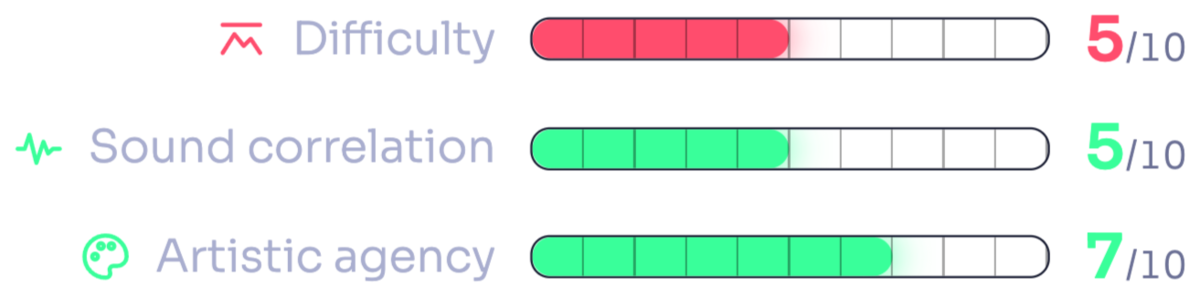
This one deserves a higher score on the sound correlation scale, because if you spend some time on a nice setup where you route the BPM and the audio from your DJ software into your VJ software, you can get some pretty powerful scene transitions going. In addition to that, a lot of pre-rendered VJ loops tend to represent a four-on-the-floor rhythm quite nicely. This, however, might not work as well for genres like bass, dubstep, breaks and others that have more varied grooves.
On the other hand, more effort will be needed. You do have to go hunt for the right visuals for your vibe and your music, so there's a selection aspect to it (which I personally enjoy and would advocate for, but to each their own). And if you don't want to get distracted while mixing, you also have to spend time setting up your project to be as automated as possible. The more complex the setup, the more moving pieces while you're on stage, so it will be more complex to run. But it will definitely give you a ton more expressive freedom and control than the real-time workflow we discussed earlier.
I think if you don't have much time to spend preparing your DJ sets beforehand at home, but you want to be as serious about your visuals as possible, this might be the right kind of workflow for you.
What about node-based apps?
Magic Music Visuals, TouchDesigner, Max/Jitter... There is a whole class of apps that puts node graphs front and center to let you drive potentially quite complex visualization programs. I think node graphs are great because they leave you a ton of flexibility and creative control, but these apps tend to have a few problems for our use case:
- They're meant to be used for visuals you intend to control manually during the performance, or with a large array of different kinds of inputs, none of which you're likely to be doing while you're DJing.
- They're difficult to learn. Resolume does have its own nodes language for real-time visuals, but you don't really have to know about it, it's more of a bonus.
- You need to be careful about building overly complex scenes, because again, you might risk freezing your laptop.
For all these reasons, I'm not going to go too in depth on workflows centered around this class of apps in this article.
3. Preparing Visuals for Each Track
If you're still reading, it means you're aiming high. You just came back from an Anyma or a Rezz show and you won't settle for anything less. Fortunately you're not alone: we share an obsession, and from this point I'll reason through a couple of ways to get to that level of precision and synergy. These two words are the key here: if you want animated renders of humanoid robots and mythical figures, you should definitely work with an artist. What we'll focus on is: given some already available visual material (VJ loops, camera footage, logos, etc.), how can you edit it to reliably fit and represent the music?
Again, in this scenario you don't have a VJ who knows all the songs in your library by heart and spends time rehearsing the show with you. You're just showing up at clubs and festivals and asking if they'll kindly hand you an HDMI to project your own stuff. In that case I think the only way forward is to prepare visuals for your songs beforehand, because all the approaches we've seen so far have the problem of being imprecise. When you don't know for sure that the software is going to understand certain very important details of the track (e.g. when exactly the drop is coming, or what groove the bassline is following), you can't be bold in highlighting those very important musical elements in your visuals. You can never be sure it will be done right, so your visuals tend to become somewhat timid.
Even when you have somebody doing this manually for you as you play, they are unlikely to get these nuances right. Have you ever noticed how a lot of electronic music tries, on purpose, to prevent you from guessing when the drop will come? Guess this: the same trick works on a VJ too. They won't feel confident guessing big variations in the track, and won't be able to extract certain properties of the music out of DSP practices alone: this results in "risk-averse" visualization choices, avoiding big and sudden moves.
Generally, the sort of show I mentioned at the top of this section is largely based on pre-rendered music videos that play in perfect synchronization with the song on the DJ console. That way all these details can be dialed in beforehand, for each track.
Why pre-render one video per song?
I know it might feel like cheating to pre-render the visuals for your songs, but think about it: as a DJ you're mixing pre-recorded music. The songs on the record are already pre-recorded from start to finish: the basic brick of a DJ performance is a pre-recorded song. Then of course you can slice them and dice them together in a million ways... And you can do exactly all of those things with a music video too: triggers, loops, even scratching. So you aren't really changing the nature of a DJ's work by simply swapping songs for their respective music videos in your library.
Taking one further step back, I think it's also important to consider the typical electronic music production process: the music producer didn't record that song on the fly. They opened a DAW (Digital Audio Workstation, a.k.a. a music-making app) and spent hours, maybe days if not weeks, perfecting every bit of it, because that's what gives you the best, most polished result.
So why not treat your visuals the same way? This is what can really make the difference between a DJ set with some unrelated visuals on the side and an intentionally choreographed audiovisual show. It's what big artists tend to do, because it does get you the best result. Your visuals can be a lot more bold, because you can be confident they'll map to the song precisely. You can tee them up to match the drop exactly, or change scene completely when the breakdown comes.
Of course, there's a catch: it might take hours to prepare even just one video for one song. So far, this has made sense especially for established artists, who also mostly tend to play their own productions. With the amount of time that goes into making electronic music, just as they collaborate with a sound engineer for mastering, it makes sense to collaborate with a visual artist to spend a few hours preparing a video for each of their tracks too.
But maybe there's a shortcut. As we'll see, I'm not suggesting you spend hours making the video for each song. You already probably spend a few minutes listening to the songs you put in your library, setting cue points, fixing beatgrids. What if it took you just five or ten minutes to make sure the visual is tippy-top too? It might be worth it then, right? So let's go through a few more workflows and see how we can boil them down to something actually practical.
Scenario 1: video editor + song-by-song sync
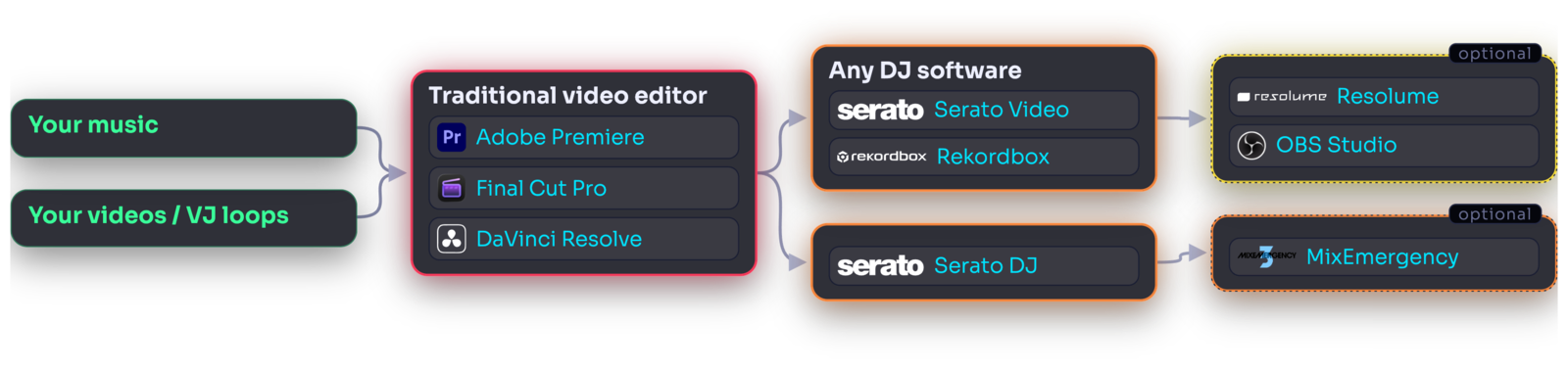
The setup could look something like the following: you have your source material, in this case a number of songs you want to play at your next gig, and you have some videos, images and VJ loops you want to edit so they fit each song.
Once your editing work is done (let's assume we got that part figured out for now) you have one music video per song, which you want to synchronize perfectly with your DJ performance. You can do this in a few different ways. The first decision depends on whether you're using a traditional DJ console made up of players and a mixer, or playing from your laptop:
- If you're playing from a DJ console, you can use an Ethernet hub to connect all the components to your laptop, and then use something like Pioneer DJ Sync to bridge playback information over to Resolume. In Resolume there's a way to tell it which video clips you want played in sync with which songs. However, if you're controlling the visuals by yourself and you aren't working together with a VJ, I think this overcomplicates things quite a bit.
- If you are DJing from your laptop, you can simply pop your videos in your DJ software's library instead of the audio files. Every DJ app out there supports mixing video very well. If you feel squeamish about having your music library made up of... not music, but videos, I understand. In that case, you can usually assign a video to its respective song in the library by drag and drop.
Of course, if you DJ from your laptop you'll have to either link the laptop to the DJ console, which is a different process depending on what gear is there, or bring your own controller. I've noticed quite a lot of DJs prefer playing with their own controllers even when a DJ console is available, and in fact, as long as you let the venue know beforehand, this shouldn't be a problem. I think this is the most practical setup, because it will always work. If you count on being able to connect your DJ software to whichever console you find at the club, I think you might have to account for potential hiccups, and it might be prudent to show up at the venue early.
I'd like to pause here for a moment, and contemplate the fact that nowadays you can just bring a couple of instruments, plug them together, and you have everything you need to perform a full audiovisual experience. Isn't it beautiful? I just think it's inspiring, but maybe that's just me.
Anyway, at this point the software involved is really very little. If you want more functionality on the video mixing side of things you can have fun augmenting your setup with extra tools. You can always route your video through Resolume for adding logos or effects. I use MixEmergency to further customize the video mixing behavior, and sometimes I chain Resolume or OBS on top of that too, depending on whether I'm playing live or streaming. But this stuff is optional and you can look at it later as a way to customize further.
An improved version of this workflow, especially if you produce your own tracks, can rely on video plugins in your DAW of choice.
One remaining issue I see in this setup is that editing your visuals in a traditional video editor will be a real pain. Even if the editor supports snapping to the tempo and other audio analysis tools, it's very difficult to trim and cut and paste your way to an audio-reactive visual, let alone to a whole library of them.
The Score
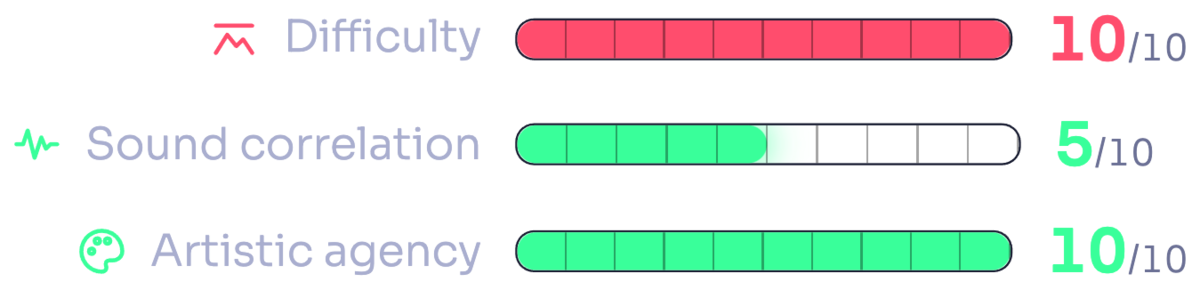
In fact I'd give this workflow the highest difficulty score, and not even that great of a sound correlation score. There's just too much variation in the music for you to capture it easily in a video editor. This is of course where you get the most artistic agency, because in a full-fledged video editor you can do pretty much anything. But you'll have a hard time quickly cutting up visuals for a whole playlist worth of songs, and you'll leave a lot of audio reactivity on the table.
Scenario 2: DAW video + song-by-song sync
On the other hand, if we use more music-oriented software, like an actual music sequencer, there's a whole host of tools that might help us obtain much better results.
This option is perhaps the most appealing if you produce your own music. It's quite dope to be able to use all those MIDI scores, the various stems and automations, to also drive the video clips and effects. FL Studio comes with its own video making utility already, and there are video synthesizers distributed as plugins you can use in Ableton or just about any DAW.
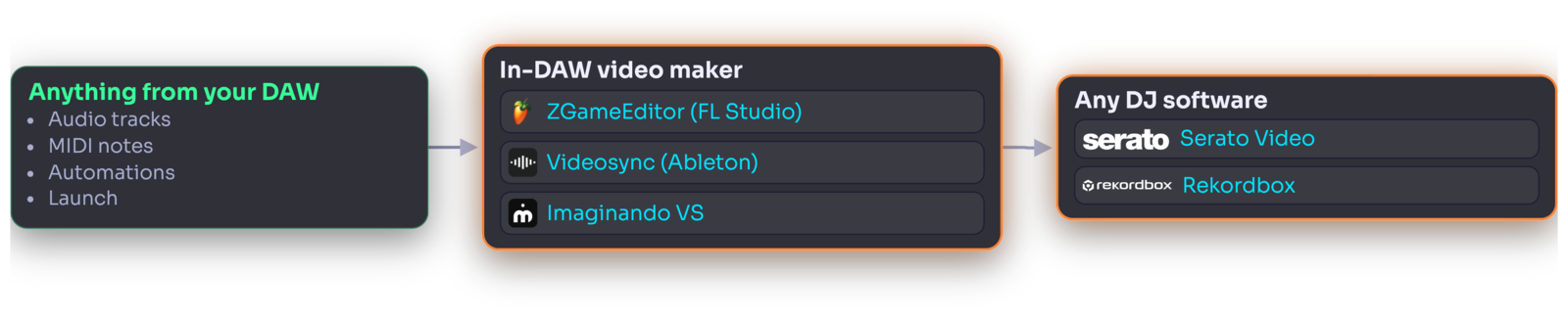
The DAW route. Fewer boxes than the video editor, and the richest inputs of any workflow here, as long as you have the MIDI and stems to begin with.
This can kind of work for songs you haven't made yourself too, because music-making apps now come with things like stem separation and groove extraction, handy tools that really help in extracting texture and detail out of any simple audio file.
It has to be said, however, that these are still quite heavy-handed workflows. Wiring all these inputs together is a process that varies greatly between every single music track, and the visual language can also be kind of limited compared with what you'd express through a traditional video editor.
The Score
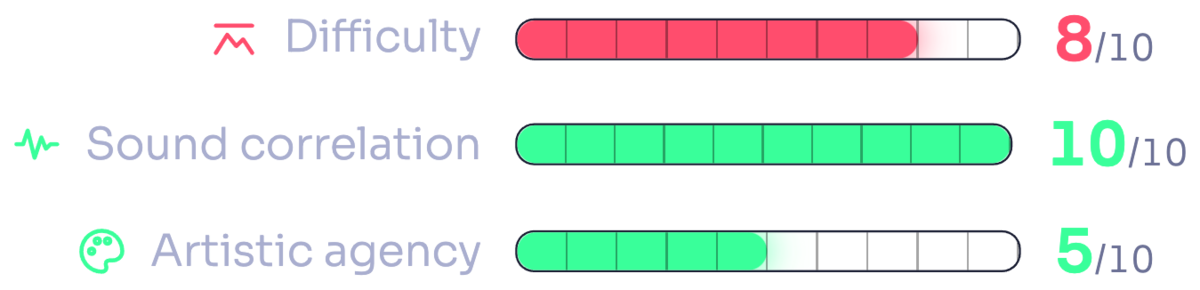
You're trading away a bit of creative freedom to get better sound correlation and save a little on effort. But if you're not producing your own tracks, I don't think this is really worth the effort, and I'd still stick with the VJ software category we discussed earlier.
Why not AI video generators?
I know I originally promised I'd discuss a method to prepare a visual for each track in 5 to 10 minutes, but before we move on I should probably address the artificial elephant in the room: AI video generators, specifically the kind that claims to create the whole music video for you given the track and a few other inputs.
I'm not exploring a workflow based on AI video generators for the following reasons:
- While they give you a lot of artistic agency (depending on how you rate it...), in my tests it appears their correlation to the sound would generally be a 2, the worst of all the options we've looked at so far. At the time of writing, there are very compelling generators that will make a character sing to the lyrics. That, however, is all the "sound reactivity" appears to amount to. This may very well change, but right now it appears AIs aren't really good at correlating visuals to the music.
- Secondly, they're very expensive. They might make sense if you're a producer and you want to make a music video for your own song, especially a lyrics-heavy one. But if you're a DJ and you want enough material to match at least tens if not hundreds of songs, it's too pricey and it tends to require an unpredictable amount of back and forth to get things right.
So I believe the best way for generative AI to aid us in our endeavor, is to create shorter clips that become part of your source material. Once you have a library of ready-made, vetted clips, you can feed them into another program like any of the ones we've seen so far, to remix and edit them to the music.
The map so far
My understanding of the situation is that as soon as you try to improve how well your visuals describe the music, hopefully without compromising artistic freedom, but regardless really, things get tough pretty quickly:
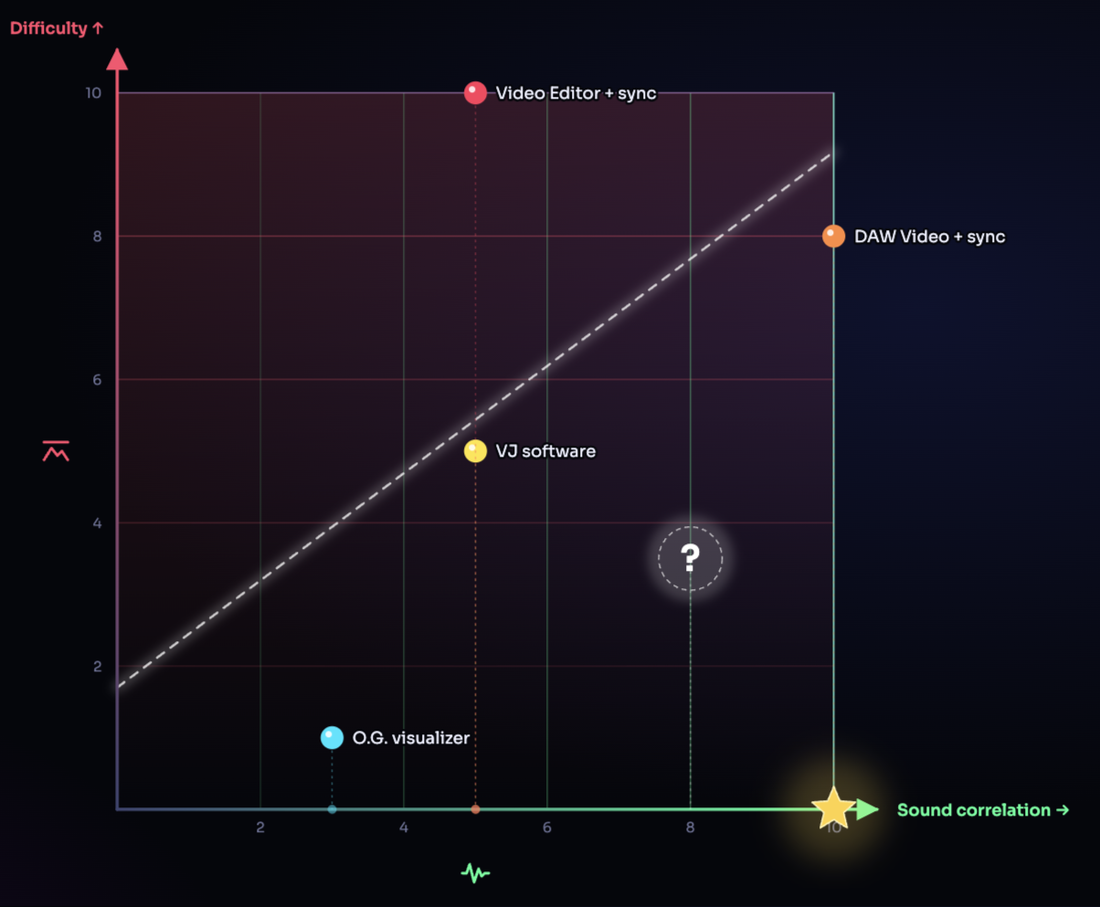
Difficulty vs sound correlation
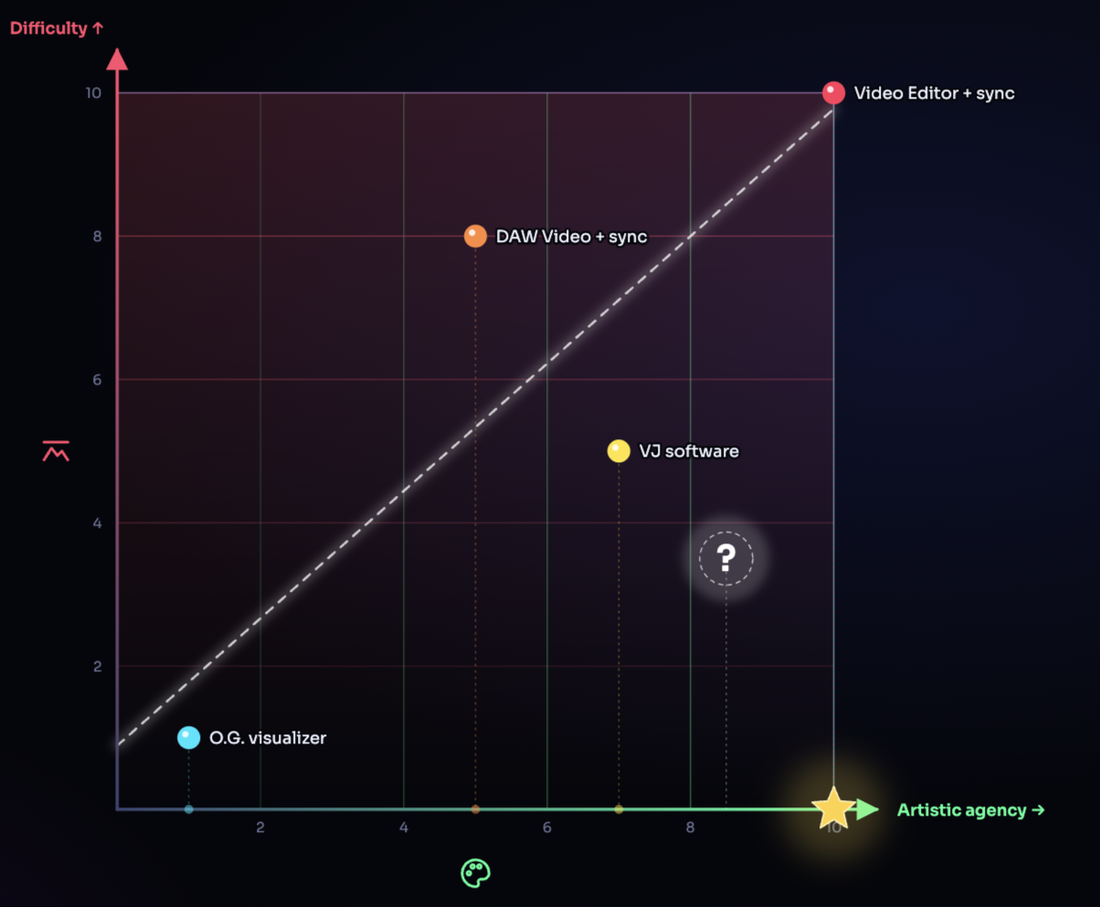
Difficulty vs artistic agency
We are missing something that can be low difficulty, high on both of the others.
And I think that is why smaller and emerging artists tend to shy away from building out immersive visual shows. They're very difficult to make. Once you do have good visuals it's not difficult at all to use them in your show, because as we've seen you can simply throw them in your DJ software and mix as you always would.
Ideally you'd want something as close as possible to that bottom corner: low difficulty, high on both of the others.
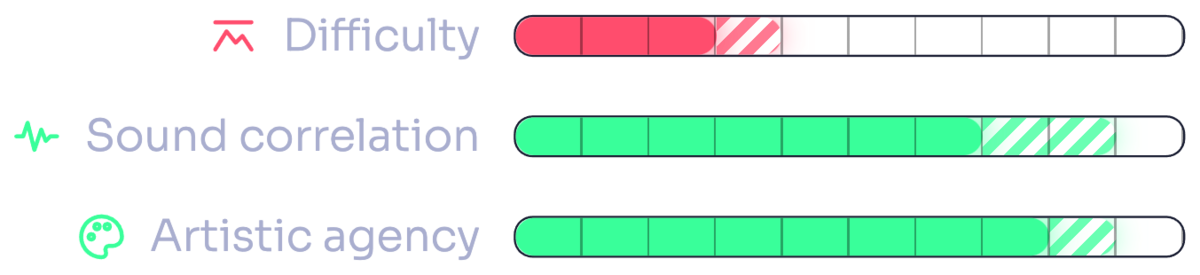
So far the trend appears to take us further and further from it.
4. Trying Something New
I spent a few years looking for something that would fit within that space, trying out workflows while prototyping, and eventually building something that would capture all the learnings. Something that doesn't compromise much on creative freedom, but is also very capable of capturing the essence of what you're hearing: things like the groove, changes of scenery, buildups, drops and a number of musical voices. But most importantly, something that lets you do all of the above as quickly and easily as possible. Not for one song, but for a collection of songs.
The final result was Vizloom.
It's an entirely new class of video editor built specifically for this kind of creative work. It allows you to curate collections of songs as well as collections of visual art, and then it helps you merge those together to turn every song into a great looking music visualization that actually does finally look like what you hear.

You might ask, how does it do that? There's a ton of design details and techniques that went into it, but in the spirit of this article I will stick to describing the resulting workflow.
The visual art and source video material I've been referring to so far can now come in the form of smart templates. These are not your typical templates. They're more like little programs that include images and videos, and encapsulate enough knowledge to edit themselves onto the song automatically. Sometimes they can even target specific genres or visual styles. Some come with the app, but any artist can make one and put it online for you to download, and you can easily make your own by customizing an existing one or building from the ground up.
When you apply a template to a song, it makes a first guess at its characteristics. Things like where the breakdowns are, where the drops are, how much to dial in certain percussions, how to timewarp the video so it follows the wobbling of the bass, etc. But the most important thing here is not actually all the fancy technology doing things automagically for you, because that's just to make things a lot faster.
The real secret ingredient in this process is you.
I know it's difficult to imagine in this day and age, but sometimes we do have to take a step back and recognize that maybe a computer can't do this job very well, and it will be a while before it can. So what are we to do in the meantime? My approach has been to build the interface around the human. While the computer can try to do 80% of the job, the artist's judgement and refinement are always necessary steps.
While Vizloom will guess the right position of the drop most of the time, you can't afford a mistake on that, because it would really ruin the show. Vizloom makes it very fast to comb through the results, take a listen, and fix anything that seems out of place. Since these templates are like little programs, your changes cascade throughout the editor so you don't need to repeat yourself. This way your visual will always be on point. And since you can trust it to correctly follow the music, you can then be much more bold with your creative ideas.
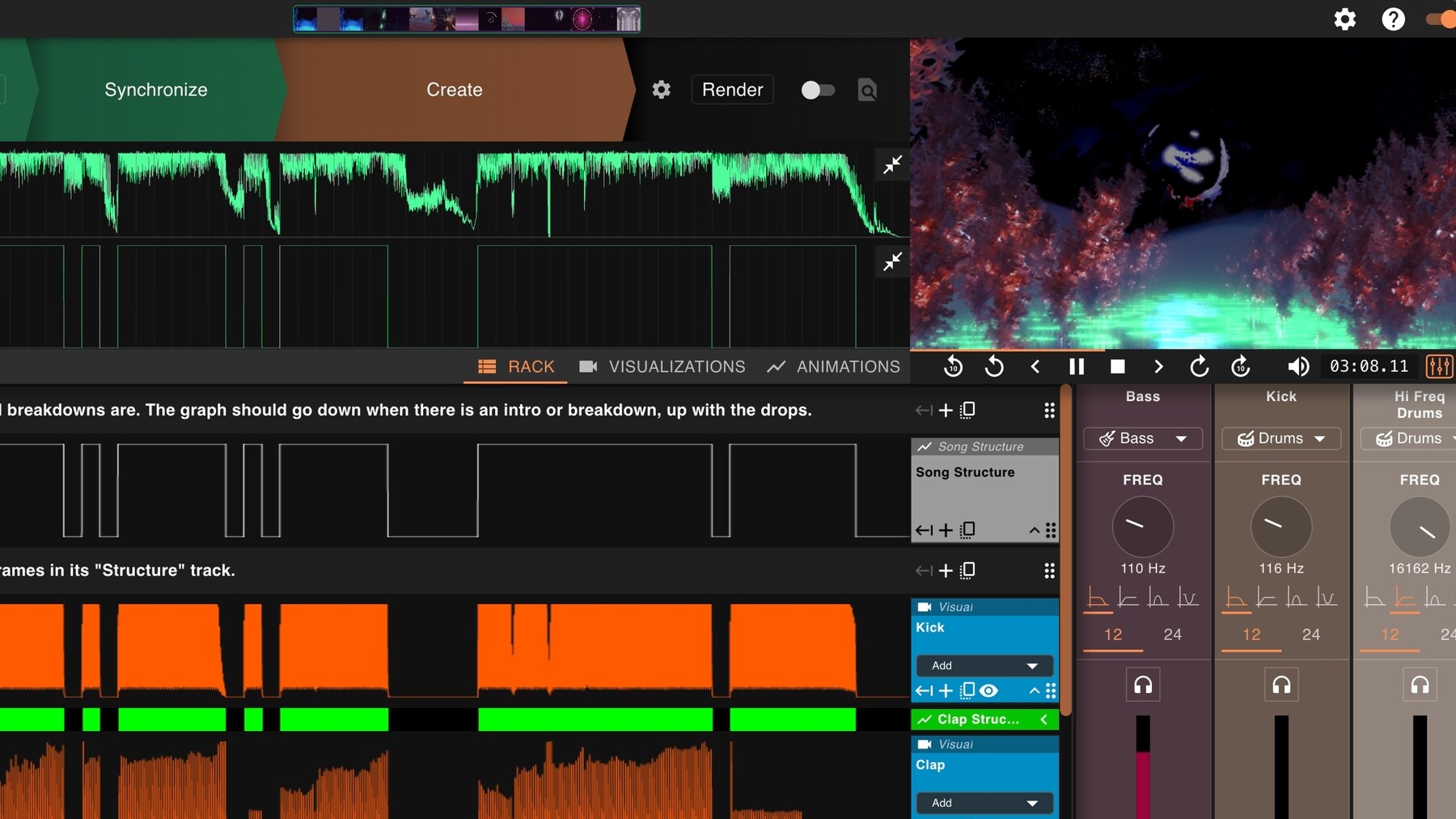
The structure graph up top is the app's first guess at the song's scenes and drops. The quickest 2-minutes workflow could consist of simply double-checking it looks correct, toggling the render switch and moving on to the next track.
Of course you can be done in five minutes and move to the next track, but if you want, you can completely customize every single little aspect of how this works. Maybe it's something simple like swapping out the bundled videos for your own, or maybe it's something more complex that eventually, slowly, leads you to make these templates your own. Over time you can pretty much automate your visual style and artistic choices so you don't have to redo the repetitive aspects of the work for every single song.
Usually I apply the template I think best fits the mood of the song, and then spend five or ten minutes tightening up some of the instruments, swapping out some of the visuals, or trying out new color combinations. Then sometimes, just sometimes, I find tracks that inspire me to try completely new things, and I spend more time creating a new type of visual instrument or further customizing what's available back in the nodes graph.
Then, as we saw earlier, I just drop the resulting videos into my DJ software of choice and have fun mixing.
Conclusions
The way this kind of synergy comes together while you mix is really fun. Think about it: if the visuals properly follow the music, it means they share similarities with each other just as the songs in your mix share similarities. So they also work together really well when mixed visually, and it's really satisfying to see how they all build on top of each other.
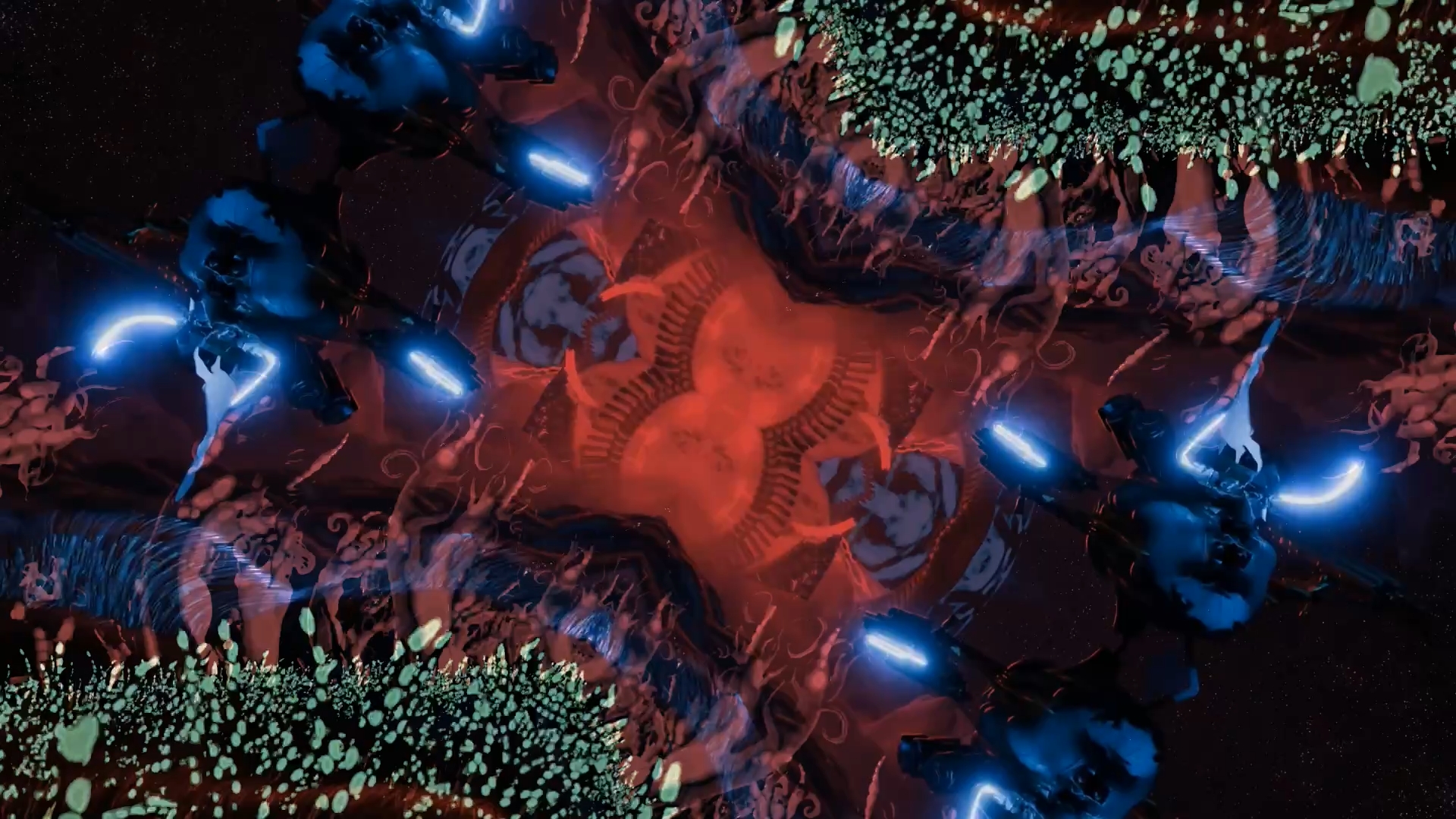
When the visuals follow the music, their movements end up sharing a family resemblance, and they mix together just as well as the tracks do.
I could talk about this for hours, so I'll stop here. The whole interactive presentation is available at vizloom.com/4-ways-to-visualize-your-dj-set, where all the names of all the apps mentioned are links you can click to go check everything out for yourself. And of course, you can try out Vizloom for free.
Whichever path you take, I hope this article helped you find some inspiration, and bring your imagination out into the world and onto the dance floor. Thank you for reading, and keep creating.